
How to Deep Train Revenue Growth Agent on Your Solutions / RGA
How to Deep Train Revenue Growth Agent on Your Solutions (In Under 60 Minutes)
Revenue Growth Agent doesn't guess what your company does — it learns it. But that intelligence only works when you feed it the right content.
Deep training is the process of teaching RGA everything about your solutions, value propositions, case studies, and customer outcomes. Once trained, RGA draws on this knowledge base every time it analyzes a discovery call, builds a proposal, or surfaces deal intelligence for your sellers.
The result? Proposals that sound like they came from your best seller — not a generic AI template.
This guide walks you through the entire content training process step by step. If you prefer video, the full walkthrough is embedded below.
Watch the full walkthrough — Deep Training RGA With Your Content (<8 min)
Why Content Training Matters
When a seller finishes a discovery conversation with a prospect, RGA generates a solution proposal tailored to what was discussed. But here's the thing — RGA can only recommend what it knows about.
If you haven't trained it on your solutions, case studies, and differentiators, the proposal will be generic. When you invest 30–60 minutes in content training, every proposal, insight, and recommendation RGA produces becomes deeply specific to your business.
Think of it this way: content training is the difference between an AI that knows about sales and an AI that knows about your sales and what makes the value you deliver differentiated.
Before You Start: Define Your Solutions First
This step is critical. Before uploading a single document or URL, you need to define the solutions (or offerings) that you want RGA focused on.
Go to Content Management → Solutions and set up each solution your sellers should be focused on. The hint here is the 80/20 rule — include only the solutions that make up the majority of your new business. If 80% of your revenue comes from three core offerings, those are the three you define.
Every piece of content you upload later gets connected back to one or more of these solutions. Skip this step and you'll spend hours reorganizing later.
Pro tip: There's a training video inside the Solutions tab. Watch it before you define your solutions — it'll save you time.
Step 1: Train RGA With Web Resources
Start with your website. Navigate to Content Management → Web Resources and begin adding the URLs that best represent your solutions.
What to add:
Solution/service pages
Case study pages
Customer testimonial pages
Industry-specific landing pages
Pricing or comparison pages
How it works:
Copy the URL of any public web page
Paste it into the Web Resources input field
Click Add Web Page
Fill in the metadata form:
Description — A short summary of what's on that page (e.g., "Our enterprise data integration solution page")
Solutions — Select which of your defined solutions this page relates to. Choose "Companywide" if it's general (like your homepage)
Target Audience — Is this page best suited for Technical, Business, or Executive audiences?
Content Type — Is this a Solution Document, Case Study, Technical Documentation, Methodology & Frameworks, or Pricing Information?
Tags — Optional, but helpful for organizing your knowledge base
Click Submit
RGA doesn't just scrape the page — it intelligently structures the content so it's far more useful when generating sales insights and proposals. Processing takes about 20 seconds per page.
Note: LinkedIn URLs are not supported well due to privacy restrictions. Stick to your own website and public content.
Step 2: Upload Solution Documents
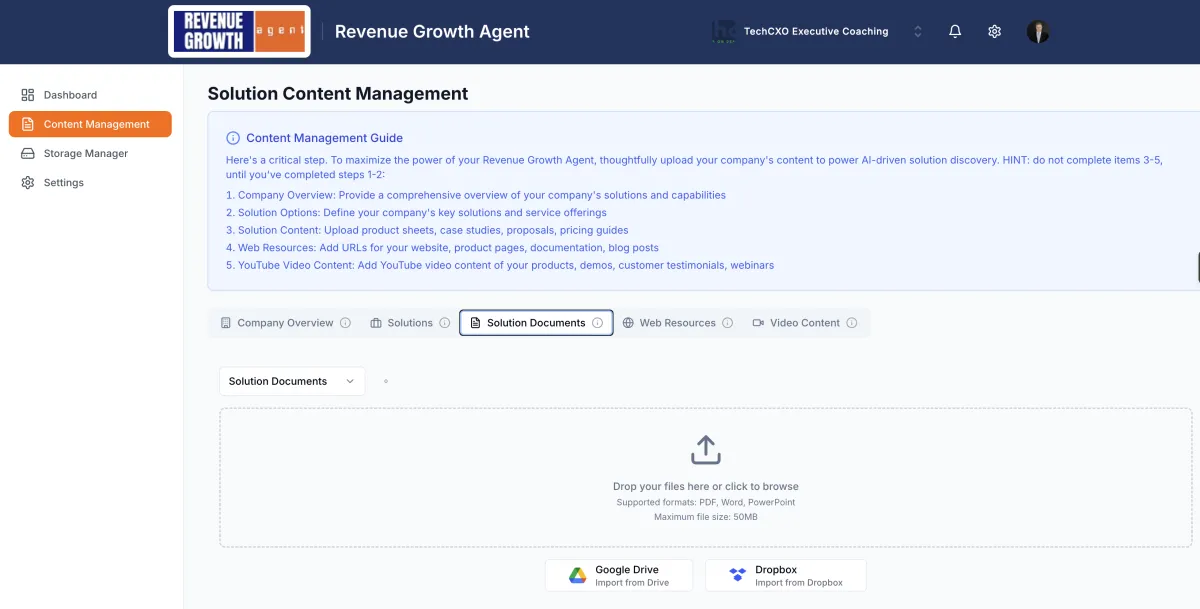
Next, go to Content Management → Solution Documents. This is where you upload the files your sales team already uses.
Supported file types:
PDF documents
PowerPoint presentations (.pptx)
Microsoft Word documents (.docx)
What to upload:
Product/solution one-pagers
Detailed capability decks
Case study PDFs
Example statements of work
Methodology overviews
Pricing guides
How it works:
Drag and drop a file (or click to browse)
Fill in the same metadata form as web resources (description, solutions, audience, content type, tags)
Click Submit
RGA processes the document, extracts the key information, and embeds it into your knowledge base. Processing takes 20–30 seconds per document.
The 80/20 rule applies here too. Upload the documents that cover the solutions your sellers focus on most. You can always add more later as you create new content or update existing materials.
Step 3: Add YouTube Video Content
If you have YouTube videos — customer testimonials, product demos, webinar recordings, or explainer videos — RGA can learn from those too.
Navigate to Content Management → Video Content.
How it works:
Copy the YouTube video URL
Paste it into the Video Content input field
Click Add Video
Fill in the metadata form (same fields as documents and web resources)
Click Submit
RGA automatically grabs the video's transcript and embeds that content into your knowledge base. If the automatic transcript fetch doesn't work, you'll see a manual fallback option — just copy the transcript from YouTube (click the "..." menu on the video → Show transcript) and paste it in.
Best candidates for video training: Customer testimonial videos, solution demo walkthroughs, and conference talks where you explain your methodology. These give RGA rich, conversational context about your value.
Keeping Your Knowledge Base Current
Content training isn't a one-time event. As your business evolves, so should RGA's knowledge.
When to update:
New case study published → Add it
Website pages redesigned → Re-add the updated URLs
New solution launched → Define it in Solutions, then train content against it
Old content retired → Delete it from RGA
You can add, update, or remove content from any of the three training tabs at any time. RGA's knowledge stays in sync with your current go-to-market materials.
What Happens After Training
Once you've trained RGA on your content, here's what changes:
Discovery analysis becomes solution-aware — RGA maps prospect pain points to your specific offerings
Proposals reference your actual capabilities, case studies, and differentiators instead of generic language
Deal intelligence connects what the prospect said to what you've proven you can deliver
The more relevant content you provide, the sharper RGA's output becomes. Most admins complete the full training in 30–60 minutes if their marketing materials are well organized.
Ready to Get Started?
If you're an existing RGA admin, head to Content Management in your dashboard and start training today.
If you'd like hands-on help getting your content loaded and optimized, book a session with the RGA team — we'll walk you through it.
FAQ Section
Q: How long does it take to fully train RGA on my solutions?
A: Most admins complete the full training in 30–60 minutes. If your marketing materials are well organized (solution pages, case study PDFs, a few key videos), you can move quickly. You can always come back and add more content over time.
Q: Do I need to retrain RGA when I update my website?
A: Yes. If you significantly update a web page that RGA has been trained on, re-add the URL so RGA picks up the new content. You can delete the old version and add the updated one.
Q: What file types can I upload as solution documents?
A: RGA supports PDF, Microsoft Word (.docx), and PowerPoint (.pptx) files. These cover the most common sales collateral formats.
Q: Can I train RGA on competitor information?
A: You can, but we recommend focusing on your own solutions and differentiators. RGA is designed to help your sellers articulate your value — not tear down competitors. If you have competitive battle cards that frame your strengths, those can be useful.
Q: What if my YouTube video doesn't have a transcript?
A: RGA first tries to pull the transcript automatically. If that fails, you'll see a manual fallback option where you can paste the transcript yourself. You can copy it directly from YouTube's "Show transcript" feature under the video's menu.
Q: How does RGA use the metadata I add (audience, content type, solutions)?
A: The metadata helps RGA serve the right content at the right time. When generating a proposal for a technical buyer, RGA prioritizes content tagged for technical audiences. When a discovery call maps to Solution #1, RGA pulls from content connected to that solution. Better metadata = sharper output.
Q: Is there a limit to how much content I can upload?
A: There's no hard limit on the number of web pages, documents, or videos you can add. However, quality matters more than quantity. Focus on the content that represents your core 80% — the solutions and proof points your sellers use most often.